Put the checkout in your own site, and the allowlist that decides which sites may.
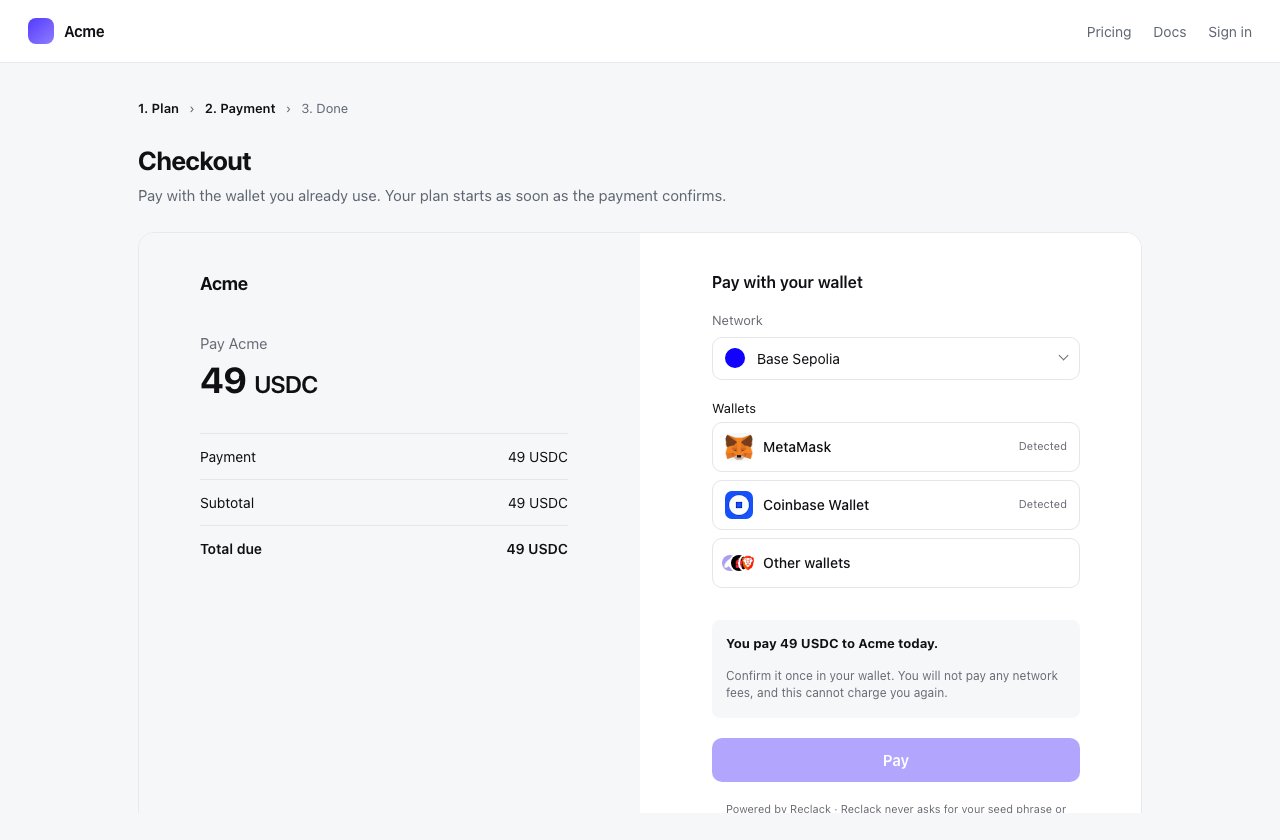
An embedded checkout is the hosted page in an iframe on your site. The payer
never leaves, and what they approve is still rendered on our origin, where your
page cannot read or rewrite it.Use @reclack/widget to put it there. This page is
about the part that is not JavaScript: which sites are allowed to frame you,
and what a browser does about it.
An embedded checkout: your page around it, ours inside it
Allow your origin
Set the list in the dashboard under Developers, then Embedding.
State
What happens
No origins listed
Any site may embed your checkout. This is what every workspace starts as
One or more listed
Those sites may embed it. Every other site gets a page saying so instead of a payment form
An origin is a scheme and a host, nothing more: https://acme.dev. Paths,
query strings and trailing slashes are dropped, only http and https are
accepted, and up to twenty origins can be listed.
http://localhost:3000 and https://localhost:3000 are different origins, as
are https://acme.dev and https://www.acme.dev. List each one you actually
embed from, staging included.
What the browser enforces
Every document we serve answers
Content-Security-Policy: frame-ancestors 'none' unless it was opened by the
widget. A hand-written <iframe src="https://pay.reclack.com/chk_..."> loads
nothing at all, and neither does a framed receipt or billing portal.
// This works: launch adds what the checkout needs to be embeddable.Reclack().launch(reference, { mode: 'inline', container: '#checkout' })
That is the first of two checks, and it is the browser’s. The second is the
checkout’s own: before it draws anything payable it compares the site framing
it against your list, and refuses if it does not match.
The checkout reads the framing origin from the browser, never from a message
the embedding page sends. A page that claims to be an allowed origin is still
measured against what the browser reports it is. A frame that hides where it
came from is refused once a list exists.
What your page is told
The two halves talk over a single MessagePort, handed to the frame and
addressed to one origin. Your page learns four things:
Callback
What it carries
onReady
The checkout has drawn something
onSuccess
{ reference, transaction, redirectUrl }
onError
A message a person can read
onClose
They closed it without paying
Nothing else crosses. Your page is not told the amount, the payer’s address or
which wallet they used, because it is another origin and the less it knows
about what happened in there the less there is to get wrong. Read the payment
from the API or the
webhook instead.The frame also reports the height it needs, which the widget applies, so your
page scrolls as one rather than a box scrolling inside a page.
Sizing, palette and return
Height is handled for you. The frame grows and shrinks with its content.
Palette follows the merchant’s setting unless your page asks for one. See
Appearance.
Return is yours to do. Set redirect_url on the session and onSuccess
hands it back as redirectUrl for you to navigate to, or ignore it and move
the payer along yourself.
When something does not appear
The frame is blank
The document refused to be framed. Check that you are launching through
the widget rather than writing your own <iframe>, and look in the console
for a frame-ancestors refusal.
It says this site cannot show this checkout
The checkout loaded and found the framing origin is not on the list. Add
the exact origin in Developers, then Embedding, and reload. The
message is deliberate: a merchant with a misconfigured list gets an
explanation rather than an empty box.
A frame from an origin that is not on the list
It works in one browser and not another
Check the iframe’s referrer policy. Where a browser cannot name the parent
origin itself, the checkout falls back to the referrer, and a frame that
suppresses it cannot be identified once a list exists.
A wallet extension cannot be seen inside the frame
Wallets inject per document, and the frame gets its own copy in every
browser we have tested. One browser withholds the provider from a frame
that does not ask for it, which the widget’s own frame attributes cover, so
use launch rather than a frame of your own.
Or do not embed at all
Redirecting to the hosted checkout needs no allowlist, no iframe and no script
on your payment page. The trade is that the payer leaves your site. See
Hosted checkout.
{"docsConfig":{"theme":"mint","$schema":"https://mintlify.com/docs.json","name":"Reclack Docs","colors":{"primary":"#533afd","light":"#8f7dff","dark":"#3b28c9"},"logo":{"light":"https://mintcdn.com/reclack/i_PBmgTWOy1QpaWl/logo/light.png?fit=max\u0026auto=format\u0026n=i_PBmgTWOy1QpaWl\u0026q=85\u0026s=9aae17cd96b1b86d90f8d5770cd405f6","dark":"https://mintcdn.com/reclack/i_PBmgTWOy1QpaWl/logo/dark.png?fit=max\u0026auto=format\u0026n=i_PBmgTWOy1QpaWl\u0026q=85\u0026s=9d5dbf9ac5d5d9c2e57a247e8e74abf1"},"favicon":"https://mintcdn.com/reclack/i_PBmgTWOy1QpaWl/favicon.ico?fit=max\u0026auto=format\u0026n=i_PBmgTWOy1QpaWl\u0026q=85\u0026s=62cc58f492f28c9d8b7950415e30c036","background":{"color":{"light":"#ffffff","dark":"#0b0d11"}},"navbar":{"links":[{"href":"mailto:[email protected]","label":"Support"},{"href":"https://playground.reclack.com","label":"Playground"}],"primary":{"type":"button","label":"Dashboard","href":"https://app.reclack.com"}},"footer":{"socials":{"x":"https://x.com/tryreclack","instagram":"https://instagram.com/tryreclack","linkedin":"https://www.linkedin.com/company/reclack"}},"contextual":{"options":["copy","view","claude","chatgpt","mcp"],"display":"header"},"styling":{"latex":false},"navigation":{"global":{"anchors":[{"anchor":"Dashboard","icon":"gauge","href":"https://app.reclack.com"},{"anchor":"Playground","icon":"flask","href":"https://playground.reclack.com"},{"anchor":"Status","icon":"signal","href":"https://status.reclack.com"}]},"pages":[]}},"deployment":{"deploymentMetadataValue":{"subdomain":"reclack","hasAudioNarration":false,"actualSubdomain":"reclack","customDomains":["docs.reclack.com"],"gitSource":{"type":"github","owner":"reclack","repo":"docs","deployBranch":"main","contentDirectory":"","isPrivate":false,"mountPath":"","label":""},"entitlements":{"AI_CHAT":{"status":"DISABLED"},"WEB_MCP":{"status":"DISABLED"},"NARRATION":{"status":"DISABLED"}},"buildId":"6af71093206816990b8babb4","clientVersion":"0.0.4143","searchFilterCounts":[{"language":"default","tag":"API reference","count":57},{"language":"default","tag":"Guides","count":25},{"language":"default","tag":"Invoices","count":9},{"language":"default","tag":"Webhooks","count":9},{"language":"default","tag":"Checkouts","count":7},{"language":"default","tag":"Get started","count":7},{"language":"default","tag":"Payment links","count":5},{"language":"default","tag":"Prices","count":5},{"language":"default","tag":"Products","count":5},{"language":"default","tag":"Settlement","count":5}]},"assistantConfig":{"enableAskAiButton":false,"enableStarterQuestions":false,"enableContextualStarterQuestions":false,"enableAskAiSearchBar":true},"basePath":"","hasChatPermissions":false,"hasWebMcpPermissions":false,"toggles":[{"name":"kill-isr","enabled":true,"variant":{"name":"disabled","enabled":false,"feature_enabled":true},"impressionData":false},{"name":"custom-rbac-roles","enabled":true,"variant":{"name":"disabled","enabled":false,"feature_enabled":true},"impressionData":false},{"name":"agent-mintlify-slack","enabled":true,"variant":{"name":"disabled","enabled":false,"feature_enabled":true},"impressionData":false},{"name":"agent-integrations-settings","enabled":true,"variant":{"name":"disabled","enabled":false,"feature_enabled":true},"impressionData":false},{"name":"rbac-expansion","enabled":true,"variant":{"name":"disabled","enabled":false,"feature_enabled":true},"impressionData":false},{"name":"automations-pr-grouping","enabled":true,"variant":{"name":"disabled","enabled":false,"feature_enabled":true},"impressionData":false},{"name":"custom-prefix","enabled":true,"variant":{"name":"disabled","enabled":false,"feature_enabled":true},"impressionData":false},{"name":"analytics-v7","enabled":true,"variant":{"name":"disabled","enabled":false,"feature_enabled":true},"impressionData":false},{"name":"user-flows-analytics","enabled":true,"variant":{"name":"disabled","enabled":false,"feature_enabled":true},"impressionData":false},{"name":"no-publish-flow","enabled":true,"variant":{"name":"disabled","enabled":false,"feature_enabled":true},"impressionData":false},{"name":"workos-onboarding","enabled":true,"variant":{"name":"disabled","enabled":false,"feature_enabled":true},"impressionData":false},{"name":"snapshot-serving-live","enabled":true,"variant":{"name":"disabled","enabled":false,"feature_enabled":true},"impressionData":false},{"name":"stripTemperatureMiddleware","enabled":true,"variant":{"name":"disabled","enabled":false,"feature_enabled":true},"impressionData":false},{"name":"support-platform-pylon-zendesk","enabled":true,"variant":{"name":"disabled","enabled":false,"feature_enabled":true},"impressionData":false},{"name":"snapshot-serving","enabled":true,"variant":{"name":"disabled","enabled":false,"feature_enabled":true},"impressionData":false},{"name":"instant-rollback","enabled":true,"variant":{"name":"disabled","enabled":false,"feature_enabled":true},"impressionData":false},{"name":"granular-notifications-server","enabled":true,"variant":{"name":"disabled","enabled":false,"feature_enabled":true},"impressionData":false},{"name":"granular-notifications","enabled":true,"variant":{"name":"disabled","enabled":false,"feature_enabled":true},"impressionData":false},{"name":"automations-fable","enabled":true,"variant":{"name":"disabled","enabled":false,"feature_enabled":true},"impressionData":false},{"name":"fixed-ai-action-pricing","enabled":true,"variant":{"name":"disabled","enabled":false,"feature_enabled":true},"impressionData":false},{"name":"automation-resolve-merge-conflict","enabled":true,"variant":{"name":"disabled","enabled":false,"feature_enabled":true},"impressionData":false},{"name":"scoped-publishing","enabled":true,"variant":{"name":"disabled","enabled":false,"feature_enabled":true},"impressionData":false},{"name":"mintql","enabled":true,"variant":{"name":"disabled","enabled":false,"feature_enabled":true},"impressionData":false},{"name":"page-level-analytics","enabled":true,"variant":{"name":"disabled","enabled":false,"feature_enabled":true},"impressionData":false},{"name":"editor-version-history-v2","enabled":true,"variant":{"name":"disabled","enabled":false,"feature_enabled":true},"impressionData":false},{"name":"billing-page-v2","enabled":true,"variant":{"name":"disabled","enabled":false,"feature_enabled":true},"impressionData":false},{"name":"full-page-search","enabled":true,"variant":{"name":"disabled","enabled":false,"feature_enabled":true},"impressionData":false},{"name":"workspace-projects","enabled":true,"variant":{"name":"disabled","enabled":false,"feature_enabled":true},"impressionData":false},{"name":"assistant-v5","enabled":true,"variant":{"name":"disabled","enabled":false,"feature_enabled":true},"impressionData":false},{"name":"fork-pr-previews","enabled":true,"variant":{"name":"disabled","enabled":false,"feature_enabled":true},"impressionData":false},{"name":"revalidation-jwt","enabled":true,"variant":{"name":"disabled","enabled":false,"feature_enabled":true},"impressionData":false},{"name":"workos-sso-scim","enabled":true,"variant":{"name":"disabled","enabled":false,"feature_enabled":true},"impressionData":false},{"name":"hobby-abuse-scan","enabled":true,"variant":{"name":"disabled","enabled":false,"feature_enabled":true},"impressionData":false},{"name":"dashboard-inbox","enabled":true,"variant":{"name":"disabled","enabled":false,"feature_enabled":true},"impressionData":false},{"name":"workos-signup","enabled":true,"variant":{"name":"disabled","enabled":false,"feature_enabled":true},"impressionData":false},{"name":"turbopuffer-dual-write","enabled":true,"variant":{"name":"disabled","enabled":false,"feature_enabled":true},"impressionData":false},{"name":"workos-enabled","enabled":true,"variant":{"name":"disabled","enabled":false,"feature_enabled":true},"impressionData":false},{"name":"approve-review-flow","enabled":true,"variant":{"name":"disabled","enabled":false,"feature_enabled":true},"impressionData":false},{"name":"editor-metadata","enabled":true,"variant":{"name":"disabled","enabled":false,"feature_enabled":true},"impressionData":false},{"name":"sso-setup-deadline-banner","enabled":true,"variant":{"name":"disabled","enabled":false,"feature_enabled":true},"impressionData":false},{"name":"turbopuffer-serve","enabled":true,"variant":{"name":"disabled","enabled":false,"feature_enabled":true},"impressionData":false},{"name":"live-agents","enabled":true,"variant":{"name":"disabled","enabled":false,"feature_enabled":true},"impressionData":false},{"name":"llms-txt-v2","enabled":true,"variant":{"name":"disabled","enabled":false,"feature_enabled":true},"impressionData":false}],"googleFontsInlined":false},"customCss":[{"filePath":"style.css","content":".font-semibold.text-primary.overflow-wrap-anywhere{color:#374151}.dark .font-semibold.text-primary.overflow-wrap-anywhere{color:#d4d4d8}.dark{--gray-50: 248 250 252;--gray-100: 241 245 249;--gray-200: 226 232 240;--gray-300: 203 213 225;--gray-400: 148 163 184;--gray-500: 100 116 139;--gray-600: 71 85 105;--gray-700: 51 65 85;--gray-800: 28 34 45;--gray-900: 20 23 29;--gray-950: 11 13 17}nav[aria-label=\"Main\"] a[href*=\"playground.reclack.com\"]{border:1px solid rgb(var(--primary) / 0.35);border-radius:0.75rem;padding:calc(0.5rem - 1px) 0.75rem;color:rgb(var(--primary));transition:background-color 0.15s ease, border-color 0.15s ease}nav[aria-label=\"Main\"] a[href*=\"playground.reclack.com\"]:hover{background-color:rgb(var(--primary) / 0.08);border-color:rgb(var(--primary) / 0.55);color:rgb(var(--primary))}.dark nav[aria-label=\"Main\"] a[href*=\"playground.reclack.com\"]{border-color:rgb(var(--primary-light) / 0.4);color:rgb(var(--primary-light))}.dark nav[aria-label=\"Main\"] a[href*=\"playground.reclack.com\"]:hover{background-color:rgb(var(--primary-light) / 0.12);border-color:rgb(var(--primary-light) / 0.65);color:rgb(var(--primary-light))}"}],"page":{"pagePath":"guides/embedding","slug":"/guides/embedding","pageMetadata":{"title":"Embedding the checkout","description":"Put the checkout in your own site, and the allowlist that decides which sites may.","href":"/guides/embedding"},"description":{"compiledSource":"\"use strict\";\nconst {jsx: _jsx} = arguments[0];\nconst {useMDXComponents: _provideComponents} = arguments[0];\nfunction _createMdxContent(props) {\n const _components = {\n p: \"p\",\n ..._provideComponents(),\n ...props.components\n };\n return _jsx(_components.p, {\n children: \"Put the checkout in your own site, and the allowlist that decides which sites may.\"\n });\n}\nfunction MDXContent(props = {}) {\n const {wrapper: MDXLayout} = {\n ..._provideComponents(),\n ...props.components\n };\n return MDXLayout ? _jsx(MDXLayout, {\n ...props,\n children: _jsx(_createMdxContent, {\n ...props\n })\n }) : _createMdxContent(props);\n}\nreturn {\n default: MDXContent\n};\n","frontmatter":{},"scope":{}},"pageType":"default","mdx":{"mdxSource":{"compiledSource":"\"use strict\";const{Fragment:_Fragment,jsx:_jsx,jsxs:_jsxs}=arguments[0];const{useMDXComponents:_provideComponents}=arguments[0];function _createMdxContent(props){const _components={a:`a`,code:`code`,li:`li`,p:`p`,pre:`pre`,span:`span`,strong:`strong`,tbody:`tbody`,td:`td`,th:`th`,thead:`thead`,tr:`tr`,ul:`ul`,..._provideComponents(),...props.components},{Accordion,AccordionGroup,CodeBlock,Frame,Heading,Note,OptimizedImage,Table,Warning}=_components;if(!Accordion)_missingMdxReference(`Accordion`,true);if(!AccordionGroup)_missingMdxReference(`AccordionGroup`,true);if(!CodeBlock)_missingMdxReference(`CodeBlock`,true);if(!Frame)_missingMdxReference(`Frame`,true);if(!Heading)_missingMdxReference(`Heading`,true);if(!Note)_missingMdxReference(`Note`,true);if(!OptimizedImage)_missingMdxReference(`OptimizedImage`,true);if(!Table)_missingMdxReference(`Table`,true);if(!Warning)_missingMdxReference(`Warning`,true);return _jsxs(_Fragment,{children:[_jsx(_components.p,{children:`An embedded checkout is the hosted page in an iframe on your site. The payer\nnever leaves, and what they approve is still rendered on our origin, where your\npage cannot read or rewrite it.`}),`\n`,_jsxs(_components.p,{children:[`Use `,_jsx(_components.a,{href:`/sdks/checkout-widget`,children:_jsx(_components.code,{children:`@reclack/widget`})}),` to put it there. This page is\nabout the part that is not JavaScript: which sites are allowed to frame you,\nand what a browser does about it.`]}),`\n`,_jsxs(Frame,{caption:`An embedded checkout: your page around it, ours inside it`,children:[_jsx(OptimizedImage,{className:`mint-block dark:mint-hidden`,src:`https://mintcdn.com/reclack/pYMqvoKirFyG4lbf/images/embed-inline.png?fit=max\u0026auto=format\u0026n=pYMqvoKirFyG4lbf\u0026q=85\u0026s=b5470a04832a85f1877d94665de3bded`,alt:`A merchant checkout page with the Reclack checkout embedded in it, sized to fit the page rather than scrolling inside a box.`,\"data-og-width\":`1280`,width:`1280`,\"data-og-height\":`840`,height:`840`,\"data-path\":`images/embed-inline.png`,\"data-optimize\":`true`,\"data-opv\":`3`,srcset:`https://mintcdn.com/reclack/pYMqvoKirFyG4lbf/images/embed-inline.png?w=280\u0026fit=max\u0026auto=format\u0026n=pYMqvoKirFyG4lbf\u0026q=85\u0026s=36bafc5245e0224517bbc104eb84b935 280w, https://mintcdn.com/reclack/pYMqvoKirFyG4lbf/images/embed-inline.png?w=560\u0026fit=max\u0026auto=format\u0026n=pYMqvoKirFyG4lbf\u0026q=85\u0026s=b30c839f95306187414d4e902c7b6c86 560w, https://mintcdn.com/reclack/pYMqvoKirFyG4lbf/images/embed-inline.png?w=840\u0026fit=max\u0026auto=format\u0026n=pYMqvoKirFyG4lbf\u0026q=85\u0026s=b374e5ada2e44d37826e3968556300f7 840w, https://mintcdn.com/reclack/pYMqvoKirFyG4lbf/images/embed-inline.png?w=1100\u0026fit=max\u0026auto=format\u0026n=pYMqvoKirFyG4lbf\u0026q=85\u0026s=dbee8f6b36f7c91ba1642686ec70b359 1100w, https://mintcdn.com/reclack/pYMqvoKirFyG4lbf/images/embed-inline.png?w=1650\u0026fit=max\u0026auto=format\u0026n=pYMqvoKirFyG4lbf\u0026q=85\u0026s=8228485cc9aaa11ef27c092cf3b82cc5 1650w, https://mintcdn.com/reclack/pYMqvoKirFyG4lbf/images/embed-inline.png?w=2500\u0026fit=max\u0026auto=format\u0026n=pYMqvoKirFyG4lbf\u0026q=85\u0026s=5c7fba4c147463469bef47f8cad4ab0b 2500w`}),_jsx(OptimizedImage,{className:`mint-hidden dark:mint-block`,src:`https://mintcdn.com/reclack/pYMqvoKirFyG4lbf/images/embed-inline-dark.png?fit=max\u0026auto=format\u0026n=pYMqvoKirFyG4lbf\u0026q=85\u0026s=c0062eac68100070e4801f5d6d7d0d97`,alt:`A merchant checkout page with the Reclack checkout embedded in it, sized to fit the page rather than scrolling inside a box.`,\"data-og-width\":`1280`,width:`1280`,\"data-og-height\":`840`,height:`840`,\"data-path\":`images/embed-inline-dark.png`,\"data-optimize\":`true`,\"data-opv\":`3`,srcset:`https://mintcdn.com/reclack/pYMqvoKirFyG4lbf/images/embed-inline-dark.png?w=280\u0026fit=max\u0026auto=format\u0026n=pYMqvoKirFyG4lbf\u0026q=85\u0026s=c491a9aa38d837b80add9aedc6e9fbd9 280w, https://mintcdn.com/reclack/pYMqvoKirFyG4lbf/images/embed-inline-dark.png?w=560\u0026fit=max\u0026auto=format\u0026n=pYMqvoKirFyG4lbf\u0026q=85\u0026s=c6cd4fd2157949d3367db9955456f094 560w, https://mintcdn.com/reclack/pYMqvoKirFyG4lbf/images/embed-inline-dark.png?w=840\u0026fit=max\u0026auto=format\u0026n=pYMqvoKirFyG4lbf\u0026q=85\u0026s=855de7bbac4348d5126f6db2a12dd161 840w, https://mintcdn.com/reclack/pYMqvoKirFyG4lbf/images/embed-inline-dark.png?w=1100\u0026fit=max\u0026auto=format\u0026n=pYMqvoKirFyG4lbf\u0026q=85\u0026s=85e946721be9e57d22cfd9e7002102bb 1100w, https://mintcdn.com/reclack/pYMqvoKirFyG4lbf/images/embed-inline-dark.png?w=1650\u0026fit=max\u0026auto=format\u0026n=pYMqvoKirFyG4lbf\u0026q=85\u0026s=cb604bf8da7f747897af306083d94e70 1650w, https://mintcdn.com/reclack/pYMqvoKirFyG4lbf/images/embed-inline-dark.png?w=2500\u0026fit=max\u0026auto=format\u0026n=pYMqvoKirFyG4lbf\u0026q=85\u0026s=b0518e851110e039eeaaa64d06315d8c 2500w`})]}),`\n`,_jsx(Heading,{level:`2`,id:`allow-your-origin`,children:`Allow your origin`}),`\n`,_jsxs(_components.p,{children:[`Set the list in the dashboard under `,_jsx(_components.strong,{children:`Developers`}),`, then `,_jsx(_components.strong,{children:`Embedding`}),`.`]}),`\n`,_jsxs(Table,{children:[_jsx(_components.thead,{children:_jsxs(_components.tr,{children:[_jsx(_components.th,{children:`State`}),_jsx(_components.th,{children:`What happens`})]})}),_jsxs(_components.tbody,{children:[_jsxs(_components.tr,{children:[_jsx(_components.td,{children:`No origins listed`}),_jsx(_components.td,{children:`Any site may embed your checkout. This is what every workspace starts as`})]}),_jsxs(_components.tr,{children:[_jsx(_components.td,{children:`One or more listed`}),_jsx(_components.td,{children:`Those sites may embed it. Every other site gets a page saying so instead of a payment form`})]})]})]}),`\n`,_jsxs(_components.p,{children:[`An origin is a scheme and a host, nothing more: `,_jsx(_components.code,{children:`https://acme.dev`}),`. Paths,\nquery strings and trailing slashes are dropped, only `,_jsx(_components.code,{children:`http`}),` and `,_jsx(_components.code,{children:`https`}),` are\naccepted, and up to twenty origins can be listed.`]}),`\n`,_jsx(Note,{children:_jsxs(_components.p,{children:[_jsx(_components.code,{children:`http://localhost:3000`}),` and `,_jsx(_components.code,{children:`https://localhost:3000`}),` are different origins, as\nare `,_jsx(_components.code,{children:`https://acme.dev`}),` and `,_jsx(_components.code,{children:`https://www.acme.dev`}),`. List each one you actually\nembed from, staging included.`]})}),`\n`,_jsx(Heading,{level:`2`,id:`what-the-browser-enforces`,children:`What the browser enforces`}),`\n`,_jsxs(_components.p,{children:[`Every document we serve answers\n`,_jsx(_components.code,{children:`Content-Security-Policy: frame-ancestors 'none'`}),` unless it was opened by the\nwidget. A hand-written `,_jsx(_components.code,{children:`\u003ciframe src=\"https://pay.reclack.com/chk_...\">`}),` loads\nnothing at all, and neither does a framed receipt or billing portal.`]}),`\n`,_jsx(CodeBlock,{filename:``,numberOfLines:`2`,language:`javascript`,children:_jsx(_components.pre,{className:`shiki shiki-themes github-light-default dark-plus`,style:{backgroundColor:`#ffffff`,\"--shiki-dark-bg\":`#0B0C0E`,color:`#1f2328`,\"--shiki-dark\":`#D4D4D4`},language:`javascript`,children:_jsxs(_components.code,{language:`javascript`,numberOfLines:`2`,children:[_jsx(_components.span,{className:`line`,children:_jsx(_components.span,{style:{color:`#6E7781`,\"--shiki-dark\":`#6A9955`},children:`// This works: launch adds what the checkout needs to be embeddable.`})}),`\n`,_jsxs(_components.span,{className:`line`,children:[_jsx(_components.span,{style:{color:`#8250DF`,\"--shiki-dark\":`#DCDCAA`},children:`Reclack`}),_jsx(_components.span,{style:{color:`#1F2328`,\"--shiki-dark\":`#D4D4D4`},children:`().`}),_jsx(_components.span,{style:{color:`#8250DF`,\"--shiki-dark\":`#DCDCAA`},children:`launch`}),_jsx(_components.span,{style:{color:`#1F2328`,\"--shiki-dark\":`#D4D4D4`},children:`(`}),_jsx(_components.span,{style:{color:`#1F2328`,\"--shiki-dark\":`#9CDCFE`},children:`reference`}),_jsx(_components.span,{style:{color:`#1F2328`,\"--shiki-dark\":`#D4D4D4`},children:`, { `}),_jsx(_components.span,{style:{color:`#1F2328`,\"--shiki-dark\":`#9CDCFE`},children:`mode:`}),_jsx(_components.span,{style:{color:`#0A3069`,\"--shiki-dark\":`#CE9178`},children:` 'inline'`}),_jsx(_components.span,{style:{color:`#1F2328`,\"--shiki-dark\":`#D4D4D4`},children:`, `}),_jsx(_components.span,{style:{color:`#1F2328`,\"--shiki-dark\":`#9CDCFE`},children:`container:`}),_jsx(_components.span,{style:{color:`#0A3069`,\"--shiki-dark\":`#CE9178`},children:` '#checkout'`}),_jsx(_components.span,{style:{color:`#1F2328`,\"--shiki-dark\":`#D4D4D4`},children:` })`})]}),`\n`]})})}),`\n`,_jsx(_components.p,{children:`That is the first of two checks, and it is the browser’s. The second is the\ncheckout’s own: before it draws anything payable it compares the site framing\nit against your list, and refuses if it does not match.`}),`\n`,_jsx(Warning,{children:_jsx(_components.p,{children:`The checkout reads the framing origin from the browser, never from a message\nthe embedding page sends. A page that claims to be an allowed origin is still\nmeasured against what the browser reports it is. A frame that hides where it\ncame from is refused once a list exists.`})}),`\n`,_jsx(Heading,{level:`2`,id:`what-your-page-is-told`,children:`What your page is told`}),`\n`,_jsxs(_components.p,{children:[`The two halves talk over a single `,_jsx(_components.code,{children:`MessagePort`}),`, handed to the frame and\naddressed to one origin. Your page learns four things:`]}),`\n`,_jsxs(Table,{children:[_jsx(_components.thead,{children:_jsxs(_components.tr,{children:[_jsx(_components.th,{children:`Callback`}),_jsx(_components.th,{children:`What it carries`})]})}),_jsxs(_components.tbody,{children:[_jsxs(_components.tr,{children:[_jsx(_components.td,{children:_jsx(_components.code,{children:`onReady`})}),_jsx(_components.td,{children:`The checkout has drawn something`})]}),_jsxs(_components.tr,{children:[_jsx(_components.td,{children:_jsx(_components.code,{children:`onSuccess`})}),_jsx(_components.td,{children:_jsx(_components.code,{children:`{ reference, transaction, redirectUrl }`})})]}),_jsxs(_components.tr,{children:[_jsx(_components.td,{children:_jsx(_components.code,{children:`onError`})}),_jsx(_components.td,{children:`A message a person can read`})]}),_jsxs(_components.tr,{children:[_jsx(_components.td,{children:_jsx(_components.code,{children:`onClose`})}),_jsx(_components.td,{children:`They closed it without paying`})]})]})]}),`\n`,_jsxs(_components.p,{children:[`Nothing else crosses. Your page is not told the amount, the payer’s address or\nwhich wallet they used, because it is another origin and the less it knows\nabout what happened in there the less there is to get wrong. Read the payment\nfrom `,_jsx(_components.a,{href:`/api-reference/checkouts/payer-get`,children:`the API`}),` or the\n`,_jsx(_components.a,{href:`/webhooks/overview`,children:`webhook`}),` instead.`]}),`\n`,_jsx(_components.p,{children:`The frame also reports the height it needs, which the widget applies, so your\npage scrolls as one rather than a box scrolling inside a page.`}),`\n`,_jsx(Heading,{level:`2`,id:`sizing-palette-and-return`,children:`Sizing, palette and return`}),`\n`,_jsxs(_components.ul,{children:[`\n`,_jsxs(_components.li,{children:[_jsx(_components.strong,{children:`Height`}),` is handled for you. The frame grows and shrinks with its content.`]}),`\n`,_jsxs(_components.li,{children:[_jsx(_components.strong,{children:`Palette`}),` follows the merchant’s setting unless your page asks for one. See\n`,_jsx(_components.a,{href:`/guides/appearance`,children:`Appearance`}),`.`]}),`\n`,_jsxs(_components.li,{children:[_jsx(_components.strong,{children:`Return`}),` is yours to do. Set `,_jsx(_components.code,{children:`redirect_url`}),` on the session and `,_jsx(_components.code,{children:`onSuccess`}),`\nhands it back as `,_jsx(_components.code,{children:`redirectUrl`}),` for you to navigate to, or ignore it and move\nthe payer along yourself.`]}),`\n`]}),`\n`,_jsx(Heading,{level:`2`,id:`when-something-does-not-appear`,children:`When something does not appear`}),`\n`,_jsxs(AccordionGroup,{children:[_jsx(Accordion,{title:`The frame is blank`,id:`the-frame-is-blank`,children:_jsxs(_components.p,{children:[`The document refused to be framed. Check that you are launching through\nthe widget rather than writing your own `,_jsx(_components.code,{children:`\u003ciframe>`}),`, and look in the console\nfor a `,_jsx(_components.code,{children:`frame-ancestors`}),` refusal.`]})}),_jsxs(Accordion,{title:`It says this site cannot show this checkout`,id:`it-says-this-site-cannot-show-this-checkout`,children:[_jsxs(_components.p,{children:[`The checkout loaded and found the framing origin is not on the list. Add\nthe exact origin in `,_jsx(_components.strong,{children:`Developers`}),`, then `,_jsx(_components.strong,{children:`Embedding`}),`, and reload. The\nmessage is deliberate: a merchant with a misconfigured list gets an\nexplanation rather than an empty box.`]}),_jsxs(Frame,{caption:`A frame from an origin that is not on the list`,children:[_jsx(OptimizedImage,{className:`mint-block dark:mint-hidden`,src:`https://mintcdn.com/reclack/pYMqvoKirFyG4lbf/images/embed-refused.png?fit=max\u0026auto=format\u0026n=pYMqvoKirFyG4lbf\u0026q=85\u0026s=a69157b7bbb474692b43ca54f3ea7b74`,alt:`The embedded checkout showing a refusal: this site cannot show this checkout, with a line saying the merchant has not allowed it to be embedded here.`,\"data-og-width\":`1280`,width:`1280`,\"data-og-height\":`940`,height:`940`,\"data-path\":`images/embed-refused.png`,\"data-optimize\":`true`,\"data-opv\":`3`,srcset:`https://mintcdn.com/reclack/pYMqvoKirFyG4lbf/images/embed-refused.png?w=280\u0026fit=max\u0026auto=format\u0026n=pYMqvoKirFyG4lbf\u0026q=85\u0026s=b8e76760e893f7822f667a3f4d231c81 280w, https://mintcdn.com/reclack/pYMqvoKirFyG4lbf/images/embed-refused.png?w=560\u0026fit=max\u0026auto=format\u0026n=pYMqvoKirFyG4lbf\u0026q=85\u0026s=12768a057fefd8298efe27785fa18988 560w, https://mintcdn.com/reclack/pYMqvoKirFyG4lbf/images/embed-refused.png?w=840\u0026fit=max\u0026auto=format\u0026n=pYMqvoKirFyG4lbf\u0026q=85\u0026s=9a17e9cf6af890ec9a132d906d8e7024 840w, https://mintcdn.com/reclack/pYMqvoKirFyG4lbf/images/embed-refused.png?w=1100\u0026fit=max\u0026auto=format\u0026n=pYMqvoKirFyG4lbf\u0026q=85\u0026s=0aec6888e6ae6054dfe1044337a726bd 1100w, https://mintcdn.com/reclack/pYMqvoKirFyG4lbf/images/embed-refused.png?w=1650\u0026fit=max\u0026auto=format\u0026n=pYMqvoKirFyG4lbf\u0026q=85\u0026s=e6c5c9bb84f21c245965b327e04db8eb 1650w, https://mintcdn.com/reclack/pYMqvoKirFyG4lbf/images/embed-refused.png?w=2500\u0026fit=max\u0026auto=format\u0026n=pYMqvoKirFyG4lbf\u0026q=85\u0026s=2f4a77cefea5897ea68b96e38f2a1844 2500w`}),_jsx(OptimizedImage,{className:`mint-hidden dark:mint-block`,src:`https://mintcdn.com/reclack/pYMqvoKirFyG4lbf/images/embed-refused-dark.png?fit=max\u0026auto=format\u0026n=pYMqvoKirFyG4lbf\u0026q=85\u0026s=534fa6a681ffa8d3636526d459304e09`,alt:`The embedded checkout showing a refusal: this site cannot show this checkout, with a line saying the merchant has not allowed it to be embedded here.`,\"data-og-width\":`1280`,width:`1280`,\"data-og-height\":`940`,height:`940`,\"data-path\":`images/embed-refused-dark.png`,\"data-optimize\":`true`,\"data-opv\":`3`,srcset:`https://mintcdn.com/reclack/pYMqvoKirFyG4lbf/images/embed-refused-dark.png?w=280\u0026fit=max\u0026auto=format\u0026n=pYMqvoKirFyG4lbf\u0026q=85\u0026s=bf1c2e2016c37623bd3d42bf8d7ea1a7 280w, https://mintcdn.com/reclack/pYMqvoKirFyG4lbf/images/embed-refused-dark.png?w=560\u0026fit=max\u0026auto=format\u0026n=pYMqvoKirFyG4lbf\u0026q=85\u0026s=de868c596530db03cc48549174565701 560w, https://mintcdn.com/reclack/pYMqvoKirFyG4lbf/images/embed-refused-dark.png?w=840\u0026fit=max\u0026auto=format\u0026n=pYMqvoKirFyG4lbf\u0026q=85\u0026s=d2fb62c033a53d4724556f1831516214 840w, https://mintcdn.com/reclack/pYMqvoKirFyG4lbf/images/embed-refused-dark.png?w=1100\u0026fit=max\u0026auto=format\u0026n=pYMqvoKirFyG4lbf\u0026q=85\u0026s=6086509136484a443f8d61c4ecd087e6 1100w, https://mintcdn.com/reclack/pYMqvoKirFyG4lbf/images/embed-refused-dark.png?w=1650\u0026fit=max\u0026auto=format\u0026n=pYMqvoKirFyG4lbf\u0026q=85\u0026s=a054104c6d11af19c3f7adf2e4bd026b 1650w, https://mintcdn.com/reclack/pYMqvoKirFyG4lbf/images/embed-refused-dark.png?w=2500\u0026fit=max\u0026auto=format\u0026n=pYMqvoKirFyG4lbf\u0026q=85\u0026s=3be855eb35a047047d06c6d1701d12f9 2500w`})]})]}),_jsx(Accordion,{title:`It works in one browser and not another`,id:`it-works-in-one-browser-and-not-another`,children:_jsx(_components.p,{children:`Check the iframe’s referrer policy. Where a browser cannot name the parent\norigin itself, the checkout falls back to the referrer, and a frame that\nsuppresses it cannot be identified once a list exists.`})}),_jsx(Accordion,{title:`A wallet extension cannot be seen inside the frame`,id:`a-wallet-extension-cannot-be-seen-inside-the-frame`,children:_jsxs(_components.p,{children:[`Wallets inject per document, and the frame gets its own copy in every\nbrowser we have tested. One browser withholds the provider from a frame\nthat does not ask for it, which the widget’s own frame attributes cover, so\nuse `,_jsx(_components.code,{children:`launch`}),` rather than a frame of your own.`]})})]}),`\n`,_jsx(Heading,{level:`2`,id:`or-do-not-embed-at-all`,children:`Or do not embed at all`}),`\n`,_jsxs(_components.p,{children:[`Redirecting to the hosted checkout needs no allowlist, no iframe and no script\non your payment page. The trade is that the payer leaves your site. See\n`,_jsx(_components.a,{href:`/guides/checkout`,children:`Hosted checkout`}),`.`]})]})}function MDXContent(props={}){const{wrapper:MDXLayout}={..._provideComponents(),...props.components};return MDXLayout?_jsx(MDXLayout,{...props,children:_jsx(_createMdxContent,{...props})}):_createMdxContent(props)}return{default:MDXContent};function _missingMdxReference(id,component){throw new Error(`Expected `+(component?`component`:`object`)+\" `\"+id+\"` to be defined: you likely forgot to import, pass, or provide it.\")}","frontmatter":{},"scope":{"config":{},"pageMetadata":{"title":"Embedding the checkout","description":"Put the checkout in your own site, and the allowlist that decides which sites may.","href":"/guides/embedding"}}},"mdxSourceWithNoJs":null},"mdxExtracts":{"tableOfContents":[{"title":"Allow your origin","slug":"allow-your-origin","depth":2,"children":[]},{"title":"What the browser enforces","slug":"what-the-browser-enforces","depth":2,"children":[]},{"title":"What your page is told","slug":"what-your-page-is-told","depth":2,"children":[]},{"title":"Sizing, palette and return","slug":"sizing-palette-and-return","depth":2,"children":[]},{"title":"When something does not appear","slug":"when-something-does-not-appear","depth":2,"children":[]},{"title":"Or do not embed at all","slug":"or-do-not-embed-at-all","depth":2,"children":[]}],"codeExamples":{}},"jsLinks":[],"dynamicCss":".mint-block {\n display: block\n}\n.mint-hidden {\n display: none\n}\n.dark\\:mint-block:is(.dark *) {\n display: block\n}\n.dark\\:mint-hidden:is(.dark *) {\n display: none\n}","subdomain":"reclack","siteName":"Reclack Docs","title":"Embedding the checkout - Reclack Docs","navMaps":{"firstHrefInVersion":{},"firstHrefInLanguage":{}},"lastModified":"2026-11-12T16:04:17.263Z","originalFileLocation":"guides/embedding.mdx"},"headHtml":"\u003cscript data-mint-head>(function(){var d=document.documentElement,p=null;if(!p){try{p=localStorage.getItem(\"isDarkMode\")}catch(e){}if(p==='true')p='dark';else if(p==='false')p='light';if(p!=='light'\u0026\u0026p!=='dark'\u0026\u0026p!=='system')p=\"system\"}var r=p==='system'?(matchMedia(\"(prefers-color-scheme: dark)\").matches?'dark':'light'):p;d.classList.remove(r==='dark'?'light':'dark');d.classList.add(r);d.setAttribute(\"data-theme-preference\",p)})();\u003c/script>\u003cmeta data-mint-head name=\"description\" content=\"Put the checkout in your own site, and the allowlist that decides which sites may.\">\u003cmeta data-mint-head name=\"application-name\" content=\"Reclack Docs\">\u003cmeta data-mint-head name=\"generator\" content=\"Mintlify\">\u003clink data-mint-head rel=\"icon\" type=\"image/png\" sizes=\"192x192\" href=\"/mintlify-assets/_mintlify/favicons/reclack/H6DBMos9VrjwkxQL/_generated/favicon/android-chrome-192x192.png\" media=\"(prefers-color-scheme: light)\">\u003clink data-mint-head rel=\"apple-touch-icon\" type=\"image/png\" sizes=\"180x180\" href=\"/mintlify-assets/_mintlify/favicons/reclack/H6DBMos9VrjwkxQL/_generated/favicon/apple-touch-icon.png\">\u003clink data-mint-head rel=\"icon\" type=\"image/png\" sizes=\"16x16\" href=\"/mintlify-assets/_mintlify/favicons/reclack/H6DBMos9VrjwkxQL/_generated/favicon/favicon-16x16.png\" media=\"(prefers-color-scheme: light)\">\u003clink data-mint-head rel=\"icon\" type=\"image/png\" sizes=\"32x32\" href=\"/mintlify-assets/_mintlify/favicons/reclack/H6DBMos9VrjwkxQL/_generated/favicon/favicon-32x32.png\" media=\"(prefers-color-scheme: light)\">\u003clink data-mint-head rel=\"shortcut icon\" type=\"image/x-icon\" href=\"/mintlify-assets/_mintlify/favicons/reclack/H6DBMos9VrjwkxQL/_generated/favicon/favicon.ico\" media=\"(prefers-color-scheme: light)\">\u003clink data-mint-head rel=\"icon\" type=\"image/png\" sizes=\"192x192\" href=\"/mintlify-assets/_mintlify/favicons/reclack/H6DBMos9VrjwkxQL/_generated/favicon-dark/android-chrome-192x192.png\" media=\"(prefers-color-scheme: dark)\">\u003clink data-mint-head rel=\"icon\" type=\"image/png\" sizes=\"16x16\" href=\"/mintlify-assets/_mintlify/favicons/reclack/H6DBMos9VrjwkxQL/_generated/favicon-dark/favicon-16x16.png\" media=\"(prefers-color-scheme: dark)\">\u003clink data-mint-head rel=\"icon\" type=\"image/png\" sizes=\"32x32\" href=\"/mintlify-assets/_mintlify/favicons/reclack/H6DBMos9VrjwkxQL/_generated/favicon-dark/favicon-32x32.png\" media=\"(prefers-color-scheme: dark)\">\u003clink data-mint-head rel=\"shortcut icon\" type=\"image/x-icon\" href=\"/mintlify-assets/_mintlify/favicons/reclack/H6DBMos9VrjwkxQL/_generated/favicon-dark/favicon.ico\" media=\"(prefers-color-scheme: dark)\">\u003cmeta data-mint-head property=\"og:title\" content=\"Embedding the checkout - Reclack Docs\">\u003cmeta data-mint-head property=\"og:description\" content=\"Put the checkout in your own site, and the allowlist that decides which sites may.\">\u003cmeta data-mint-head property=\"og:site_name\" content=\"Reclack Docs\">\u003cmeta data-mint-head property=\"og:url\" content=\"https://docs.reclack.com/guides/embedding\">\u003cmeta data-mint-head property=\"og:type\" content=\"website\">\u003cmeta data-mint-head property=\"og:image\" content=\"https://reclack.mintlify.site/_mintlify/api/og/v2?division=Taking+payments\u0026amp;title=Embedding+the+checkout\u0026amp;description=Put+the+checkout+in+your+own+site%2C+and+the+allowlist+that+decides+which+sites+may.\u0026amp;theme=97ad7d1fc7b45fbdbc9384d0\u0026amp;signature=1fd0fd0ded09e4fd8476b306a1359b25a2244e6608038130a5b60d36052c96cc\">\u003cmeta data-mint-head property=\"og:image:width\" content=\"1200\">\u003cmeta data-mint-head property=\"og:image:height\" content=\"630\">\u003cmeta data-mint-head name=\"twitter:card\" content=\"summary_large_image\">\u003cmeta data-mint-head name=\"twitter:title\" content=\"Embedding the checkout - Reclack Docs\">\u003cmeta data-mint-head name=\"twitter:description\" content=\"Put the checkout in your own site, and the allowlist that decides which sites may.\">\u003cmeta data-mint-head name=\"twitter:image\" content=\"https://reclack.mintlify.site/_mintlify/api/og/v2?division=Taking+payments\u0026amp;title=Embedding+the+checkout\u0026amp;description=Put+the+checkout+in+your+own+site%2C+and+the+allowlist+that+decides+which+sites+may.\u0026amp;theme=97ad7d1fc7b45fbdbc9384d0\u0026amp;signature=1fd0fd0ded09e4fd8476b306a1359b25a2244e6608038130a5b60d36052c96cc\">\u003cmeta data-mint-head name=\"twitter:image:width\" content=\"1200\">\u003cmeta data-mint-head name=\"twitter:image:height\" content=\"630\">\u003cmeta data-mint-head name=\"msapplication-config\" content=\"/mintlify-assets/_mintlify/favicons/reclack/H6DBMos9VrjwkxQL/_generated/favicon/browserconfig.xml\">\u003cmeta data-mint-head name=\"apple-mobile-web-app-title\" content=\"Reclack Docs\">\u003cmeta data-mint-head name=\"msapplication-TileColor\" content=\"#533afd\">\u003clink data-mint-head rel=\"canonical\" href=\"https://docs.reclack.com/guides/embedding\">\u003clink data-mint-head rel=\"alternate\" type=\"application/xml\" href=\"/sitemap.xml\">\u003clink data-mint-head rel=\"alternate\" type=\"text/markdown\" href=\"/guides/embedding.md\">\u003cscript data-mint-head type=\"application/ld+json\">{\"@context\":\"https://schema.org\",\"@graph\":[{\"@type\":\"Organization\",\"@id\":\"https://docs.reclack.com/#organization\",\"name\":\"Reclack Docs\",\"url\":\"https://docs.reclack.com\",\"logo\":{\"@type\":\"ImageObject\",\"url\":\"https://mintcdn.com/reclack/i_PBmgTWOy1QpaWl/logo/light.png?fit=max\u0026auto=format\u0026n=i_PBmgTWOy1QpaWl\u0026q=85\u0026s=9aae17cd96b1b86d90f8d5770cd405f6\"}},{\"@type\":\"WebSite\",\"@id\":\"https://docs.reclack.com#website\",\"name\":\"Reclack Docs\",\"url\":\"https://docs.reclack.com\",\"publisher\":{\"@id\":\"https://docs.reclack.com/#organization\"}},{\"@type\":\"WebPage\",\"@id\":\"https://docs.reclack.com/guides/embedding#webpage\",\"url\":\"https://docs.reclack.com/guides/embedding\",\"name\":\"Embedding the checkout\",\"description\":\"Put the checkout in your own site, and the allowlist that decides which sites may.\",\"dateModified\":\"2026-11-12T16:04:17.263Z\",\"isPartOf\":{\"@id\":\"https://docs.reclack.com#website\"},\"breadcrumb\":{\"@id\":\"https://docs.reclack.com/guides/embedding#breadcrumb\"}},{\"@type\":\"BreadcrumbList\",\"@id\":\"https://docs.reclack.com/guides/embedding#breadcrumb\",\"itemListElement\":[{\"@type\":\"ListItem\",\"position\":1,\"name\":\"Taking payments\",\"item\":\"https://docs.reclack.com/guides/checkout\"},{\"@type\":\"ListItem\",\"position\":2,\"name\":\"Embedding the checkout\",\"item\":\"https://docs.reclack.com/guides/embedding\"}]},{\"@type\":[\"Article\",\"TechArticle\"],\"@id\":\"https://docs.reclack.com/guides/embedding#article\",\"headline\":\"Embedding the checkout\",\"name\":\"Embedding the checkout\",\"description\":\"Put the checkout in your own site, and the allowlist that decides which sites may.\",\"url\":\"https://docs.reclack.com/guides/embedding\",\"mainEntityOfPage\":{\"@id\":\"https://docs.reclack.com/guides/embedding#webpage\"},\"dateModified\":\"2026-11-12T16:04:17.263Z\",\"publisher\":{\"@id\":\"https://docs.reclack.com/#organization\"},\"isPartOf\":{\"@id\":\"https://docs.reclack.com#website\"}}]}\u003c/script>\u003cscript data-mint-head type=\"application/ld+json\">{\"@context\":\"https://schema.org\",\"@type\":\"WebSite\",\"name\":\"Reclack Docs\",\"publisher\":{\"@type\":\"Organization\",\"name\":\"Reclack Docs\"},\"provider\":{\"@type\":\"Organization\",\"name\":\"Mintlify\",\"url\":\"https://mintlify.com\"}}\u003c/script>","agentPointerHref":"/guides/embedding.md","siteName":"Reclack Docs","nav":{"global":{"anchors":[{"anchor":"Dashboard","icon":"gauge","href":"https://app.reclack.com"},{"anchor":"Playground","icon":"flask","href":"https://playground.reclack.com"},{"anchor":"Status","icon":"signal","href":"https://status.reclack.com"}]},"tabs":[{"tab":"Guides","groups":[{"group":"Get started","pages":[{"title":"Reclack API","href":""},{"title":"Quickstart","href":"/quickstart"},{"title":"Authentication","href":"/authentication"},{"title":"Environments","href":"/environments"},{"title":"Networks","href":"/networks"},{"title":"Errors","href":"/errors"},{"title":"Idempotency","href":"/idempotency"}]},{"group":"Core objects","pages":[{"title":"How the objects fit","href":"/guides/objects"},{"title":"Products and prices","href":"/guides/products-and-prices"},{"title":"Customers","href":"/guides/customers"}]},{"group":"Taking payments","pages":[{"title":"Hosted checkout","description":"Create a session, send your customer to it, and hear about the result.","href":"/guides/checkout"},{"title":"Embedding the checkout","href":"/guides/embedding"},{"title":"Appearance","description":"Your logo, your two colours, and whether the checkout opens light or dark.","href":"/guides/appearance"},{"title":"Payment links","href":"/guides/payment-links"},{"title":"Invoices","href":"/guides/invoices"}]},{"group":"SDKs and libraries","pages":[{"title":"SDKs and libraries","href":"/sdks/overview"},{"title":"Checkout widget","href":"/sdks/checkout-widget"},{"title":"WalletKit","href":"/sdks/walletkit"}]},{"group":"Recurring billing","pages":[{"title":"Subscriptions","href":"/guides/subscriptions"},{"title":"Usage billing","href":"/guides/usage-billing"},{"title":"Customer portal","href":"/guides/customer-portal"}]},{"group":"Money and events","pages":[{"title":"Settlement","href":"/guides/settlement"},{"title":"Webhooks","href":"/webhooks/overview"},{"title":"Verifying webhooks","href":"/webhooks/verifying"},{"title":"Event types","href":"/webhooks/events"}]}]},{"tab":"API reference","pages":[{"title":"API reference","href":"/api-reference/introduction"}]}]},"basePath":"","title":"Embedding the checkout - Reclack Docs","buildId":"dpl_Fyv1NbzwP68g2bEH2Roy98uY1zmE","deploymentId":"dpl_Fyv1NbzwP68g2bEH2Roy98uY1zmE","dynamics":["07c022d89b","a74be98ba7"],"chunks":["Frame-D2acuaLg.js","DynamicMarkdown-Co5nikxh.js","zoom-image-lightbox-BbK2OBGL.js","lightbox-handle-r17bVUz3.js"]}